 SVENNISAI

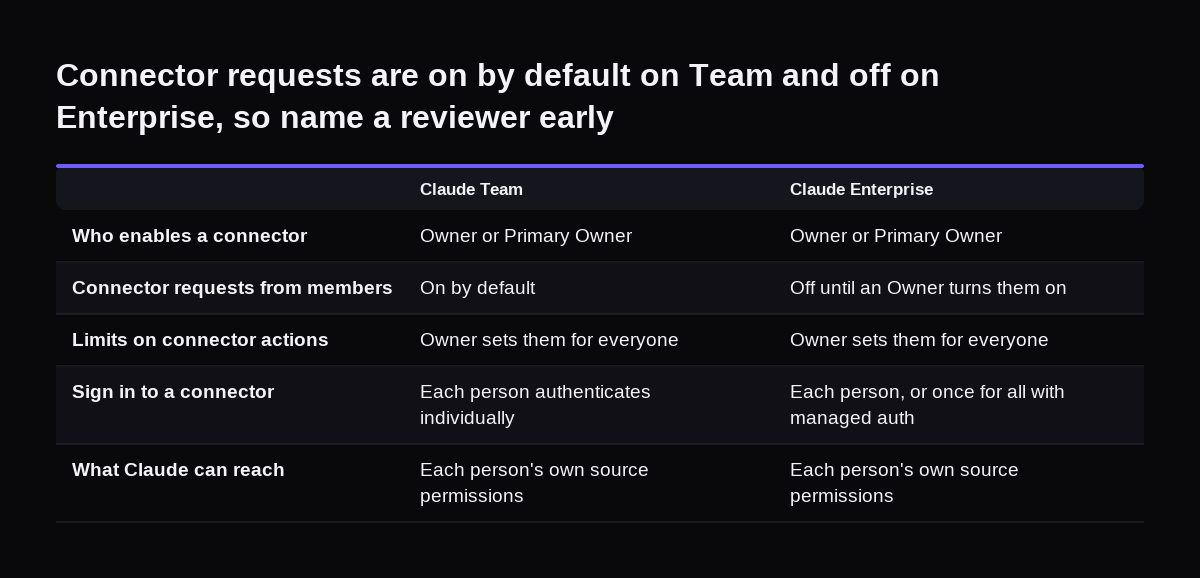
Start with one or two Claude connectors for tools whose access rights are already tidy, and keep them read-only at first. On Team and Enterprise plans, an Owner or Primary Owner enables each connector for the organisation. Each person then signs in individually. Claude can only reach what that person can already reach in the source system.
Claude connectors are links that let Claude access your apps and services, retrieve your data and take actions within those services. That definition comes from Anthropic's own Help Center article on connectors. The article explains how to switch connectors on. It says less about the questions an admin faces first: which connectors to enable, with what permissions, and who signs them off.
This guide covers those questions in order:
- What connectors are and where they work.
- How to choose the first connector.
- How per-user permissions and admin approval work.
- How to restrict actions.
- Why custom connectors need extra care.
- A worked example and a rollout checklist.
- What all this means for a company in the UK.