
Skip to content
SVENNISAI
Blog · Claude

Claude design for business teams: what it makes, who can use it, what to check

Claude can build trackers, shared documents, dashboards and animated explainers for your team. This guide covers what each does, which plans get it, how sharing works and what to check.
9 min readThe Svennis team. Drafted with Claude, reviewed by the team. Editorial policy
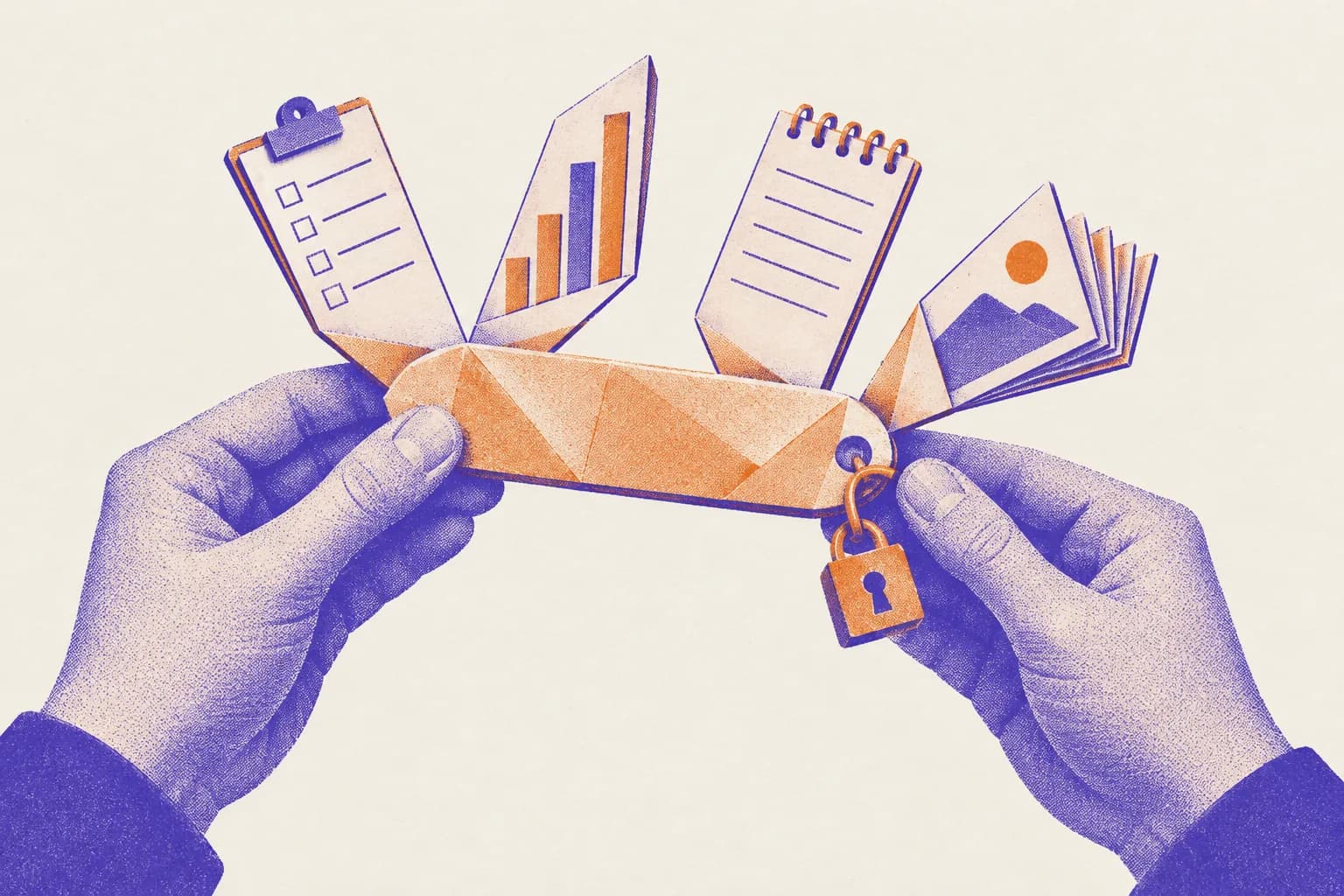
Hands holding a paper multi-tool with four unfolded blades shaped like a form, a chart, a notepad and a flip-book, plus a padlock

Claude design for business teams: what it makes and who gets it

Claude design work for a business team means Claude builds a page on request. That page can be an interactive tracker or form, a shared document, a data dashboard or an animated explainer. Each page opens beside the conversation and has its own link for sharing. Saving entries and connected tools need a paid plan. The animated format is limited to Team and Enterprise.

The central term is the custom artifact. A custom artifact is an interactive page that Claude builds from scratch for your request, such as a tracker or an intake form, and it can save what people enter. The Claude Academy tutorial on custom artifacts describes this format and three related ones.

This guide uses the Academy tutorial and Anthropic's Help Center release notes. Neither page describes a standalone product called Claude Design. For that reason, this guide gives no launch date, plan list or admin switch for such a product. When a setting matters, check it in your own organisation's admin settings.

A search for the phrase also turns up CLAUDE DESIGN LIMITED, company number 15272280 at Companies House. It is a private limited company in London, incorporated on 9 November 2023 and listed under SIC 74100, specialised design activities. It is a company registration, not a Claude feature.

What Claude builds: custom artifacts, Docs, Dashboards and Motion

Claude can build four kinds of output for a team, and they differ in purpose and in plan. The Academy tutorial names all four. The table sets out what each one is and which plans the tutorial says it needs.

OutputWhat it isStatus and plans, per the tutorial
Custom artifactAn interactive page built for your request, such as a tracker or an intake form, that can save what people enterSaving entries and connected tools need a paid plan
Claude DocsA document that you, your teammates and Claude all write in at the same timeNo plan restriction stated
Claude DashboardsCharts and numbers from your data, for quick exploratory questionsBeta, paid plans
Claude MotionAn animated explainer, chart or product walkthroughBeta, Team and Enterprise

For most teams, the custom artifact is the practical starting point. A one-page intake form, a project tracker or a client one-pager with live fields all fit this format. Claude Docs suits text that several people draft together. Claude Dashboards suits a quick question about numbers, not a reporting system you rely on every month.

A slide deck is a different job with its own tooling, so this guide leaves it aside. If you need moving visuals rather than slides, Claude Motion covers animated explainers and walkthroughs. Treat both Dashboards and Motion as beta features. Their behaviour may change.

Which Claude plans unlock saving, connected tools and Motion

A paid Claude plan is what turns a design page into a working team tool. The Academy tutorial says that saving entries and using connected tools both need a paid plan. Without one, a page cannot keep what people type into it. It also cannot read from Slack, Asana or Google Calendar.

The beta formats have their own limits:

  • Claude Dashboards is available on paid plans.
  • Claude Motion is available on Team and Enterprise only.

Usage follows the person, not the page. When Claude is added to an artifact, each person's use counts toward their own plan, like any other message. Ten colleagues who work in one shared tracker therefore draw on ten allowances, not on the creator's.

Enterprise is easier to buy than it used to be. Since February 2026, the release notes say, any organisation can buy an Enterprise plan directly on Anthropic's website with no Sales conversation. That matters if you need Enterprise controls but have no account manager.

This guide quotes no seat prices, because the pages behind it do not include Anthropic's pricing page. For a costed view of seats and usage, see what Claude costs for a business and how to start.

Admin settings to check before your team starts

An owner or administrator should confirm which features are switched on before you announce Claude design pages to staff. Team and Enterprise organisations do not always start with the same defaults as personal plans. Organisation settings can also block a feature that the model itself supports.

Three settings from Anthropic's own pages show why this check matters:

  • Memory. The release notes say memory is on by default for Free, Pro and Max plans and off by default for Team and Enterprise organisations.
  • Web search. The models overview says an administrator can disable web search. Requests that use it then fail, even when the model supports it.
  • Smart reports. On Enterprise, a beta feature called smart reports analyses how a team uses Claude. It covers the work done, what it costs and where sessions run into friction.

The pages we checked do not state an Enterprise default for design features. Do not assume either way. Open your organisation settings and confirm which artifact, Dashboards and Motion options are enabled. Then confirm which connected tools members may use.

Ownership needs the same care as settings. At Svennis we name an owner for every shared artifact that can write to a connected tool before the first link goes out. We then test the page with a colleague who holds fewer permissions than the creator.

Sharing a Claude artifact: what colleagues see and whose access it uses

Every Claude artifact has its own link, so you can share it with your team and work in it together. Sharing works differently from forwarding a file, and three rules decide what each colleague gets.

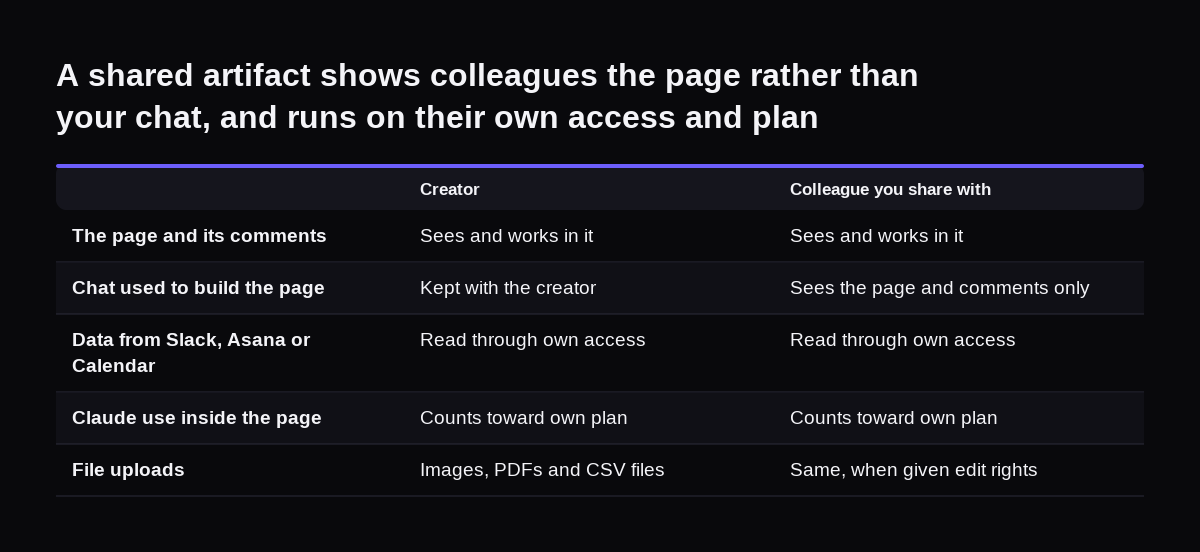
First, colleagues see the page, not your chat. People you share with see the artifact and its comments, but not your conversation with Claude. Anything you typed into the chat while building the page stays out of their view. That includes background on a client or a draft price.

Second, the page uses each viewer's own connections. If an artifact reads from Slack, Asana or Google Calendar, it uses the viewer's access, not yours. A colleague without access to a source sees an error in that part of the page instead of your data. That protects your data, but it can confuse people who expect the same view as the creator.

Third, a connected page can act, not only read. The tutorial says an artifact can read from connected tools and make changes in them. A shared tracker that creates Asana tasks will create them under whoever is using it. Agree with the team what the page may change before you share it.

When you move from a few pages to a whole department, the order of steps matters. Our guide to rolling out Claude Team to a whole team covers that sequence.

A shared artifact shows colleagues the page rather than your chat, and runs on their own access and plan. Creator / Colleague you share with. The page and its comments: Sees and works in it / Sees and works in it; Chat used to build the page: Kept wi

Data handling in Claude artifacts: uploads, saved entries and exports

A Claude artifact can hold business data, so treat it as a small system, not a sketch. The Academy tutorial sets out four behaviours that decide where your data sits and how long it stays.

Uploads

People in your organisation who can edit an artifact can upload files to it. The tutorial names images, PDFs and spreadsheets saved as CSV. Edit rights therefore decide who can add a client list or a price sheet to the page.

Saved entries and storage

Saved entries are still there the next time anyone opens the artifact, even after Claude changes the page. You can redesign a form without losing what people have entered. Each artifact has a storage limit, and the Help Center lists it. Check that limit before a page becomes the team's main record.

HTML exports

An artifact can be exported as HTML, but the copy is static. In the exported copy, the parts that save entries, use Claude or use connected tools stop working. Keep the live link as the working version and use exports for archive or reference only.

Older artifacts

Artifacts made in a chat before 16 September 2026 still work, and their published links still open. Pages your team built earlier do not need rebuilding.

Worked example: a client intake tracker for a sales team

This worked example builds a client intake tracker on a paid Team plan. It uses only behaviours the Academy tutorial describes. A sales manager wants one shared page where the team logs new enquiries, and a task appears for each one.

  1. Ask for the page. In a chat, the manager writes: "Build an intake tracker for new client enquiries with fields for company, contact, service wanted and next step, and save each entry." Claude builds a working first version beside the conversation.
  2. Refine the layout. The manager asks for a status column and a filter by service. Entries saved earlier stay in place after the change.
  3. Connect a tool. With Asana connected, the manager asks the page to create an Asana task for each new enquiry. The artifact can now read from Asana and make changes in it.
  4. Load existing data. The manager uploads last month's enquiries as a CSV file. Only colleagues with edit rights can upload.
  5. Share the link. The team opens the tracker from its link. They see the page and its comments, not the manager's chat.
  6. Test with a junior account. A colleague without Asana access opens the page. The task section shows an error instead of the manager's data, which confirms that access is enforced per person.
  7. Decide on exports. The manager keeps the live link as the record. An HTML export would lose saving and the Asana link.

The tracker now does real work, so it needs an owner, a storage check against the Help Center limit and a rule on who may edit. Those three decisions take minutes and prevent most later confusion.

What Claude design pages mean for a UK company: DPIAs and the ICO toolkit

A UK company that puts personal data into Claude artifacts should decide early whether it needs a data protection impact assessment. A DPIA is the assessment UK GDPR requires before processing that is likely to result in a high risk to individuals. An intake tracker holding client contacts, or a staff dashboard, can fall into scope.

The ICO's guidance on when a DPIA is needed sets out the tests:

  • Article 35(3) lists three types of processing that always require a DPIA.
  • The ICO's Article 35(4) list adds ten more. One covers innovative technologies, including AI, when combined with any of the European criteria.
  • The European guidelines give nine criteria for likely high risk. In most cases a combination of two indicates the need for a DPIA.
  • Employees can count as vulnerable data subjects where a power imbalance stops them easily objecting.

The ICO recommends doing a DPIA if you are in any doubt. If you decide you do not need one, document your reasons. A staff performance tracker built as an artifact deserves particular care, given the point about employees.

For the risk review itself, the ICO's AI and data protection risk toolkit is a spreadsheet that opens in Excel. The ICO notes that the guidance is under review after the Data (Use and Access) Act, so check it for updates before you rely on it.

Next steps: one shared page first, then your own systems

The practical first step is a single shared artifact for one team, built and checked against the points in this guide. Use this checklist:

  1. Confirm in your organisation settings which design features and connected tools are enabled.
  2. Pick one page with a clear owner, such as an intake tracker or a team one-pager.
  3. Test it with a colleague who has fewer permissions than the creator.
  4. Check the artifact storage limit in the Help Center against the data you expect.
  5. Decide whether the data in it calls for a DPIA, and record the decision.

Pages become more useful when they draw on what your company already knows. Our guide to building a company knowledge base Claude can use covers that groundwork.

A tracker or dashboard that should read from your own systems, such as Zoho CRM, needs a proper connection. For each connection, Svennis builds a connector, an MCP server, a plugin or a skill. We show you the options with their cost, and you choose.

If you want the whole team working this way, the route runs in four steps: a Workshop, a pilot, a department Activation and then monthly operations. For a team-wide start, see Pilot Claude B, Claude Team set up for your team. For a faster start on adoption alone, see Claude Team adoption for your staff.

Sources

  1. Claude Academy: Build and share tools in Claude with custom artifacts
  2. Claude Help Center: Release notes
  3. Anthropic: Models overview
  4. Companies House: CLAUDE DESIGN LIMITED overview
  5. ICO: When do we need to do a DPIA?
  6. ICO: AI and data protection risk toolkit
Free, 30 minutes

Pick a time. Bring the process this article made you think of.

You leave with a clear yes or no on putting Claude on it, and the step that fits from our published prices. You speak to someone who builds the agents, not a salesperson.

Prefer to call? +44 7588 772736

30 minutes · video call · free
  1. 1Time
  2. 2Details
  3. 3Booked