

Skip to content
SVENNISAI
Blog · Claude Sonnet 5.5

Claude Sonnet 5.5 for business: what changed from Sonnet 5 and when to switch

Claude Sonnet 5.5 costs the same per token as Sonnet 5, runs faster and usually needs fewer tokens. This guide covers prices, settings, breaking changes and which work to move.
10 min readThe Svennis team. Drafted with Claude, reviewed by the team. Editorial policy
Delivery van at a fork choosing between a winding road and a straight shortcut blocked by five orange traffic cones

Claude Sonnet 5.5 in short: same price as Sonnet 5, fewer tokens, five breaking changes

If your business already runs on Sonnet 5, Claude Sonnet 5.5 is worth switching to for most everyday work. The per-token price has not changed, and Anthropic says the model usually needs fewer tokens for the same task. The catch is technical. Code already running on Sonnet 5 hits five breaking changes, so API integrations need a short migration before they move.

Claude Sonnet 5.5 is the Sonnet model Anthropic released on 28 September 2026 as the second model in the Claude 5.5 family. Its pricing page describes it as "the best combination of speed and intelligence". It sits between Claude Haiku 5.5, the small model for high-volume work, and Claude Opus 5.5, which Anthropic still rates as stronger for complex, open-ended judgement.

This guide covers the decision for a company already on Sonnet 5. It explains what changed, what the model costs, which settings matter and how to move a live process. It ends with a table of the work that moves and the work that stays on Haiku 5.5 or Opus 5.5. If you want the background on Sonnet 5 itself, the earlier post on Claude Sonnet 5 as the everyday business model covers it.

What changed from Sonnet 5 to Sonnet 5.5: speed, cost per task and safeguards

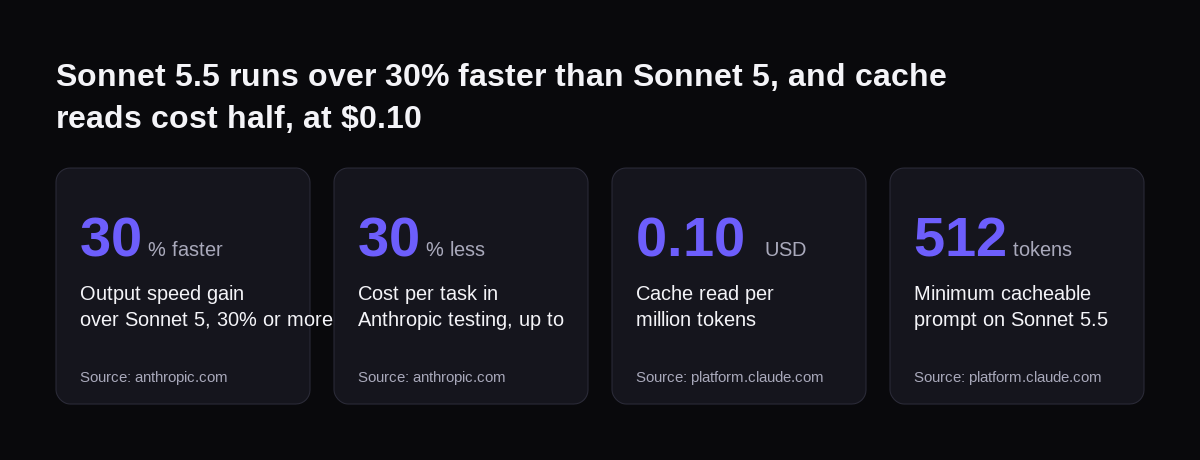
The biggest change in Claude Sonnet 5.5 is efficiency, not price. Anthropic states that Sonnet 5.5 generates output more than 30% faster than Sonnet 5, which makes it the fastest Sonnet model so far. In Anthropic's testing it costs up to 30% less per task, because it typically needs far fewer tokens. Tokens are the pieces of text a model reads and writes, and you pay per token.

Capability

Anthropic reports a large jump on agentic work. On Terminal-Bench 4.0, which measures complex multi-step tasks in a command-line interface, Sonnet 5.5 scores 70.6% against Sonnet 5's 10.3%. On the launch page, Zendesk reports that tickets were processed 20% faster with Sonnet 5.5, and another customer reports it was 2.4 times faster than the last model and used 12% fewer tokens.

Caching

Prompt caching reuses parts of a prompt you send repeatedly, such as a long system prompt, so the API reads them at a reduced price. Cache reads on Sonnet 5.5 cost $0.10 per million tokens, half of Sonnet 5's $0.20. The minimum cacheable prompt also falls from 1,024 tokens on Sonnet 5 to 512 tokens. Shorter prompts can now be cached.

Safeguards

Sonnet 5.5 is the first Sonnet model to launch with cyber safeguards and fallbacks like those on Anthropic's most capable models. Higher-risk cybersecurity tasks visibly fall back to Sonnet 5. The biology safeguards are the same as Sonnet 5's, and Anthropic warns that some microbiology and virology requests may be flagged in error.

What stayed the same

The tokenizer is unchanged, so the same text produces the same token counts as on Sonnet 5. Context window and output limits are 1M tokens and 128K tokens.

Sonnet 5.5 runs over 30% faster than Sonnet 5, and cache reads cost half, at $0.10: Output speed gain over Sonnet 5, 30% or more 30 % faster, Cost per task in Anthropic testing, up to 30 % less, Cache read per million tokens 0.10 USD, Minimum cacheab
Source: anthropic.com, platform.claude.com

Claude Sonnet 5.5 API prices against Haiku 5.5, Opus 5.5 and Fable 5.2

Claude Sonnet 5.5 costs $2 per million input tokens and $10 per million output tokens on the Claude API, exactly as Sonnet 5 did. Prices are quoted per million tokens, written MTok, in US dollars. The table sets Sonnet 5.5 beside the models you would otherwise choose, using Anthropic's Claude pricing page and the launch page.

ModelInput per MTokOutput per MTokAnthropic's positioning
Claude Haiku 5.5from $0.10from $0.50High-volume, latency-sensitive tasks such as classification, extraction and routing
Claude Sonnet 5$2$10Previous Sonnet; cache reads $0.20
Claude Sonnet 5.5$2$10Best combination of speed and intelligence; cache reads $0.10
Claude Opus 5.5$4$20Long-running agentic coding and knowledge work
Claude Fable 5.2$8$40Demanding reasoning and long-horizon agentic work

Haiku 5.5's listed rate applies to prompts up to 100,000 tokens. Two discounts apply on top of the base rates. The Batch API, which processes large volumes of requests asynchronously, gives 50% off input and output tokens. On Sonnet 5.5 a prompt cache hit costs 5% of the standard input price, which is the $0.10 per million tokens above.

A same price per token does not guarantee a lower bill. Your cost depends on how many tokens each task uses, which depends on effort level and task type. The section on testing cost per task below covers how to check that on your own work.

Effort and thinking settings on Sonnet 5.5: defaults and what to set

Effort is the control for thinking depth, latency and cost on Claude Sonnet 5.5. Higher effort lets the model think longer, which can improve quality but uses more output tokens. Sonnet 5.5 offers five levels: low, medium, high, xhigh and max.

The default depends on where you use the model. In Claude Code and the Claude apps, the default effort is medium. On the Claude Platform, which is the API, the default is high. Anthropic also warns that effort levels are recalibrated. A given level does not produce the same amount of thinking as it did on Sonnet 5, so a setting copied from an old integration will not behave identically.

Adaptive thinking and between_tools

Adaptive thinking is on by default. It lets the model decide how much to think before answering. On Sonnet 5 you could turn thinking off. On Sonnet 5.5 a request that sends thinking: {"type": "disabled"} returns a 400 error.

The replacement on Sonnet 5.5 is between_tools, the lowest thinking setting, which turns off up-front thinking.

The between_tools setting works at low, medium and high effort. At xhigh or max effort, a request with between_tools returns a 400 error. If a process needs speed more than depth, between_tools at low or medium effort is the setting to test first.

The breaking changes for code already running on Sonnet 5

Anthropic's model page states that five breaking changes affect code already running on Sonnet 5. If you only use Claude through the apps, you will not notice them. If you run your own integration or agent on the API, check each one before you change the model ID.

The documented changes a business integration is most likely to hit are these:

  • Thinking off: thinking: {"type": "disabled"} returns a 400 error. Use between_tools instead.
  • Sampling settings: setting temperature, top_p or top_k returns a 400 error.
  • Forced tool use: tool_choice set to {"type": "any"} or to a named tool returns a 400 error.
  • Computer use: on the Claude API and on Google Cloud, the earlier computer_20251124 tool is not accepted. Use the computer_toolset_20260801 toolset. Amazon Bedrock still accepts the earlier tool.
  • Advisor tool: it rejects four models as advisors: Opus 4.8, Opus 4.7, Sonnet 5 and Haiku 5.5.

One more change alters the response shape without failing any request. Text between tool calls now comes back in thinking blocks. If your code reads the answer from text blocks only, it may miss content.

Two account rules matter too. Thinking blocks from Sonnet 5.5 work only in the account that produced them or a linked account. The API also checks whether anything before a Sonnet 5.5 thinking block, such as the system prompt, the tools or an earlier message, has changed since the block was produced. A request that replays the block after such an edit can return a 400 error, so keep conversations append-only.

Where Sonnet 5.5 is available: Claude apps, the API and cloud platforms

Claude Sonnet 5.5 is available in the Claude apps, in Claude Code and on every API route Anthropic offers. On the Claude Platform the model ID is claude-sonnet-5-5. Anthropic says the model is available to all API customers.

The model page lists six platforms:

  • the Claude API
  • Amazon Bedrock
  • Claude Models on Google Cloud (Google managed)
  • Microsoft Foundry
  • Claude Platform on AWS
  • Claude Models on Google Cloud (Anthropic managed)

Billing differs by route. Claude Platform on AWS and Claude in Microsoft Foundry bill in Claude Consumption Units (CCUs), and Claude Models on Google Cloud (Anthropic managed) also bills in CCUs. Token usage is rated in US dollars at standard rates, then converted at $0.01 per CCU. That matters if your finance team already buys cloud services through one provider and wants Claude on the same invoice.

Feature support also varies slightly by platform, as the computer use example in the breaking changes shows. Check the platform column on the model page for any feature your process depends on.

Sonnet 5.5 will be retired no sooner than 28 September 2027. If you build a process on it now, you have at least a year before you need to plan the next move. In Claude Team, Sonnet 5.5 appears in the model picker at medium effort by default.

Worked example: moving a support reply agent from Sonnet 5 to Sonnet 5.5

Take a support agent that drafts replies to tickets in Zoho Desk. The agent runs on the Claude API, looks up the customer through a tool and writes a draft for a person to approve. On Sonnet 5 it used thinking off, a low temperature and forced tool use to make sure it always fetched the customer record. Moving it to Claude Sonnet 5.5 takes six concrete changes.

  1. Model ID. Change the model to claude-sonnet-5-5.
  2. Thinking. Replace {"type": "disabled"} with {"type": "between_tools"}.
  3. Effort. Set it explicitly, starting at medium, because the API default is high and between_tools fails at xhigh or max.
  4. Sampling. Remove temperature. Leaving it in returns a 400 error.
  5. Tool choice. Remove the forced tool_choice. Tell the agent in the system prompt to fetch the customer record before drafting, and check in testing that it does.
  6. Response parsing. Read thinking blocks as well as text blocks, since text between tool calls now arrives as thinking.

Then look at caching. If the system prompt sits between 512 and 1,024 tokens, it could not be cached on Sonnet 5 but can be now. Every cache hit then costs 5% of the input price.

Finally, run the old and new versions side by side on the same tickets. Compare the drafts, the token counts and the time to answer before you switch traffic.

Which work moves to Sonnet 5.5 and which stays on Haiku 5.5 or Opus 5.5

Most work that ran well on Sonnet 5 should move to Claude Sonnet 5.5, because the per-token price is the same and the model is faster. The exceptions sit at either end. Very high-volume sorting belongs on Haiku 5.5, and open-ended judgement still belongs on Opus 5.5. The table below gives the rule for common business tasks.

TaskModelReason
Classifying, extracting and routing many itemsHaiku 5.5Anthropic positions it for high-volume, latency-sensitive tasks, from $0.10 / $0.50 per MTok
Drafting replies, summaries and reportsSonnet 5.5Same price as Sonnet 5, faster output
Agents that call tools across several stepsSonnet 5.5Large gain on agentic tasks in Anthropic's testing
Large overnight jobsSonnet 5.5 on the Batch API50% off input and output tokens
Complex, open-ended work needing sustained judgementOpus 5.5Anthropic says Opus 5.5 remains clearly stronger here
Demanding reasoning and long-horizon agentsFable 5.2For when Opus 5.5 at higher effort still falls short

Anthropic's models overview recommends starting with Opus 5.5 if you are unsure which model to use. For a company already on Sonnet 5, that advice applies mainly to the hard cases in the bottom rows. The post on which steps need Claude Opus 5.5 covers that end. The broader matching of tasks to models is in Opus, Sonnet or Haiku: which Claude model when.

Cost per task on Sonnet 5.5: test it on your own work before switching

The cost of Claude Sonnet 5.5 depends on your workload, so measure it on your own requests before you switch a live process. Anthropic says the model costs up to 30% less per task in its testing. An independent measurement points the other way at the top effort level.

Artificial Analysis's review of Sonnet 5.5 found that, at max effort, the model used about 193,000 output tokens per task on its Intelligence Index. It describes that as the highest token use it has measured. On its test suite, cost per task was about 50% higher than Sonnet 5's. Artificial Analysis also notes it tested a pre-release deployment with a structured-outputs bug, which Anthropic fixed for public release.

The two findings are compatible. A faster, more capable model can save tokens at moderate effort and burn far more at max effort. Effort is the setting that decides which outcome you get.

At Svennis we move a live process to a new model only after running a sample of its real recent requests through both models, at the effort level we intend to use. We compare output quality and token counts per request, then choose. That check usually settles the effort level as well as the model.

What Sonnet 5.5 means for a UK company

For a UK company, Claude Sonnet 5.5 changes little on data handling and much on running cost. Anthropic states that Sonnet 5.5 is available with zero data retention, as Opus 5.5 and Sonnet 5 were. If your Sonnet 5 setup relied on that arrangement, you can keep it on the new model. The Batch API is not covered by zero data retention, so check before you move overnight jobs that handle personal data onto it.

Prices are listed in US dollars, so your bill moves with the exchange rate as well as with token use. Where requests run also affects price. For recent models, Sonnet 5.5 included, specifying US-only inference through the inference_geo parameter adds a 1.1x multiplier to all token prices. Do not set it unless you have a reason to.

Two plan details are relevant to smaller firms. Since October 2026, Team and Max plans include monthly API credits for running your own apps and agents on the Claude Platform. That lets a small team test a Sonnet 5.5 integration without a separate budget. On Team and Enterprise plans, owners decide whether staff can use memory.

Switching models does not change your legal duties. If the process handles personal data, the rules you already follow still apply. The guide to AI law in the UK for businesses sets out what applies.

Next steps for moving from Sonnet 5 to Sonnet 5.5

The switch to Claude Sonnet 5.5 is a short project if you take it in order. These are the steps for a company already running Sonnet 5:

  1. List every place you use Sonnet 5: the Claude apps, Claude Code and each API integration.
  2. For the apps, switch the model and watch results for a week. The default effort there is medium.
  3. For each integration, check the breaking changes: thinking off, sampling settings, forced tool use, edited conversation history, computer use and the advisor tool.
  4. Set effort explicitly rather than relying on the API default of high.
  5. Run a sample of real requests through both models and compare quality, token counts and speed.
  6. Move high-volume sorting to Haiku 5.5 and keep open-ended judgement on Opus 5.5.

If your team already pays for Claude seats but the work is not landing in your systems, the Claude Relaunch service puts those seats to work. For a wider start, Svennis works in four steps: a Workshop, then Pilot Claude A (an AI agent on Claude for one process) or Pilot Claude B (Claude Team for the whole team), then the department Activation, then monthly operations. The Claude for business guide to costs and getting started sets out what each step involves and what it costs.

Sources

  1. Introducing Claude Sonnet 5.5 (Anthropic)
  2. Claude Sonnet 5.5 model page (Claude Platform Docs)
  3. What's new in Claude Sonnet 5.5 (Claude Platform Docs)
  4. Pricing (Claude Platform Docs)
  5. Models overview (Claude Platform Docs)
  6. Release notes (Claude Help Center)
  7. Claude Sonnet 5.5 review (Artificial Analysis)
  8. Use Claude's chat search and memory (Claude Help Center)
Free, 30 minutes

Pick a time. Bring the process this article made you think of.

You leave with a clear yes or no on putting Claude on it, and the step that fits from our published prices. You speak to someone who builds the agents, not a salesperson.

Prefer to call? +44 7588 772736

30 minutes · video call · free
  1. 1Time
  2. 2Details
  3. 3Booked